Running real models locally on a Mac Studio that isn't new anymore
How I run a multimodal LLM on four-year-old hardware to read a family archive without sending anything to the cloud.
I have a multi-generational archive of handwritten family letters in my house, and I wanted to read it without sending the private content to a cloud provider. The first post is the why. This one is the how, on the specific hardware I already own, with the software I landed on.
My Mac Studio is almost four years old. M1 Max, 64 GB of RAM. It’s proven more than capable of running large language models locally. It keeps private content in the house, and it costs a lot less than any cloud provider.
Why a four-year-old Mac still works
The reason any of this works is unified memory. On Apple Silicon, the CPU and GPU share the same pool of RAM, so a 64 GB machine can hand 40-something gigabytes to a model without copying it across a bus. On a comparably priced PC, you’re limited by GPU VRAM, which is a much smaller number.
That single architectural choice is why my Mac Studio, four years old and not top-spec, can load a 35-billion-parameter multimodal model and transcribe a page of cursive in under a minute. Apple Silicon has been good at local inference since the M1, and most people with one of these machines don’t realize what’s already on their desk. I can’t run the largest frontier models at home, but for reading handwriting, a well-chosen 30B-ish model is more than enough.
LM Studio, in practice
If you’re starting from zero, use LM Studio. It’s a free desktop app that runs local models behind an OpenAI-compatible API. Any tool, script, or library that talks to OpenAI can talk to LM Studio with a URL change.
- Install it. Download, drag to Applications, launch.
- Browse the model catalog. The built-in search shows what’s available and whether each model will actually fit on your hardware.
- Download a GGUF-quantized build. GGUF is the efficient file format used by local inference tools. Quantization trades a small amount of precision for a much smaller memory footprint. For a 35B model, you’re looking at around 20 GB after quantization.
- Load the model. The one I settled on is
Qwen3.6-35B-A3B, a multimodal mixture-of-experts model. 35 billion total parameters, but only about 3 billion fire per token. It runs at the speed of a much smaller model while carrying the knowledge of a much larger one. - Start the local server. One toggle in the UI. It exposes an OpenAI-compatible endpoint at
http://localhost:1234/v1. Load one model at a time. LM Studio serializes GPU work, so keeping extras loaded just wastes RAM.
Ollama is the obvious alternative. Also OpenAI-compatible, on http://localhost:11434/v1, command-line-first instead of GUI-first. I tried both. LM Studio ended up faster in my setup and the GUI made swapping models easier.
Two non-obvious gotchas
These are the things I wish someone had told me.
“Enable Thinking” silently eats your output budget. Qwen3.6 and other reasoning-capable models can emit <think>…</think> blocks before answering. LM Studio hides them from visible output, but those tokens still count against max_tokens. Symptom: your transcription stops mid-word, or a generated chapter cuts off halfway through. Fix: turn Thinking off for long-form work. Transcribing handwriting is a perception task, not a reasoning task. Chain-of-thought doesn’t help you read cursive. It just costs tokens.
A text-only model handed an image will hallucinate a full transcription. This is the scariest failure mode I hit. When my pipeline’s auto-detect picked a text-only MoE and sent it an image, it didn’t error out. It produced a fluent, completely fabricated transcription. No visual input, just invented handwriting. Fast, fluent, wrong. The defense: verify your vision runs actually touched a vision-capable model. Vision-capable Qwen builds are tagged VL. If the model ID doesn’t signal vision and you’re expecting a transcription, something is off.
The pipeline
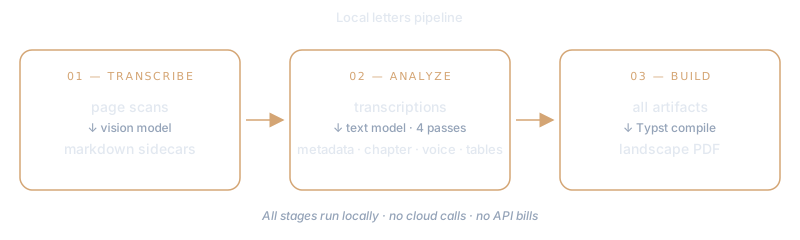
Three stages, all local, all against http://localhost:1234/v1.
transcribe_images.py walks a directory of page scans and asks the vision model for a verbatim transcription per page. On Qwen3.6-35B-A3B that’s 45 to 50 seconds per page, about 18 hours of wall-clock time for the roughly 1,500-page archive. I leave it running overnight.
analyze_letters.py makes four text-only passes over the transcriptions: per-letter metadata, a narrative year chapter, voice and recurring catchphrases, and structured reference tables.
build_year_book.py generates Typst source and compiles it into a landscape PDF, scan on the left page and transcription on the right. Typst is a modern typesetting system, like a cleaner LaTeX.
Context lives at analysis, not at transcription
The analysis stage reads a separate context file, larry_context.md, that I maintain by hand. It encodes things the letters assume but the model can’t figure out alone: the family tree, who married whom, which children carry which surname, places and neighbors, chronological landmarks, and known transcription artifacts to watch for.
The structure is one block per branch of the family, listing the parents, the spouse who married in, and the children with correct surnames. The file also carries explicit rules. Don’t invent a surname that isn’t in the letters. Nieces and nephews take their father’s name, not the letter-writer’s. If a name appears that isn’t in this file, leave the surname blank rather than guess. Known transcription artifacts get called out too, so the analysis stage doesn’t compound a vision-stage misread into a narrative error.
That file gets prepended to every analysis prompt: per-letter metadata, year chapter, voice pass, tables. It’s the difference between the model writing a sibling reference ambiguously and naming each niece and nephew correctly on the first pass.
What I deliberately don’t do is give this file to the transcription stage. Handing the vision model a list of expected names risks priming it to hallucinate those names into cursive even when the handwriting doesn’t support them. Perception at the vision stage. Semantics at the analysis stage. Keep them separate.
This runs end-to-end on my desk. No cloud, no API bill, no content leaving the house. The hardware is almost four years old and I’m doing work on it that wasn’t possible at any price a few years ago.
In the next post I’ll get into the surprising part: which model actually turned out to be best at reading my father’s cursive, and why it wasn’t the one I expected.